Search This Blog

Friday, December 9, 2016

DAX Calculate Number of Months

Hi Friends,

I was working on a dataset where I need to calculate number of months between 2 dates. I was using SQL Server 2012/14 so was not able to use newly introduced DATEDIFF function for that.

So, how to calculate Months based on 2 dates using DAX? Well below is the formula for that

DataSet
DATA_DATE                                     FUTURE_DATE
09/30/2016                                         12/1/2019
09/30/2016                                         1/1/2020
09/30/2016                                         2/1/2020
09/30/2016                                         5/1/2020

Expected
DATA_DATE                                     FUTURE_DATE        MONTHS
09/30/2016                                         12/1/2019                    39
09/30/2016                                         1/1/2020                      40
09/30/2016                                         2/1/2020                      41
09/30/2016                                         5/1/2020                      44

Solution
Below is the formula to calculate Months

=(YEAR([FUTURE_DATE])-YEAR([DATA_DATE]))*12+MONTH([FUTURE_DATE])-MONTH([DATA_DATE])

Incase we have some blanks in "FUTURE_DATE" (could be a case) then use BLANK() function.

=IF([Calendar]<>BLANK(),(YEAR([FUTURE_DATE])-YEAR([DATA_DATE]))*12+MONTH([FUTURE_DATE])-MONTH([DATA_DATE]),BLANK())

Happy Learning....

Tuesday, May 1, 2012

SQL 2012 Database Tunning Advisor DTA - Procedure Cache

Hi Friends,

Its Sunday afternoon and prior to go out for shopping this evening I tought lets write a blog.

Here by in this blog I will be talking about a new cool feature of SQL Server 2012 Database Tunning Advisor - Plan Cache.

Untill SQL 2008 we were just having 3 option to provide work load to DTA in order to analyze and tune.


Note: If we directly open DTA and create a new session it will show 2 options only i.e. File and Table (as above pic). But if we open query analyzer and select the query that want to tune and then right click and then say "Analyze Query In Database Tunning Advisor" then it will show the third option "Query" (below pic).

This same feature "Query" is available there in SQL 2012 as well.

SQL 2012 Database Tunning Advisor Workload - Plan Cache

Starting from SQL 2012, in Database Tunning Advisor we can provide a new form of workload i.e. Plan Cache. This is pretty cool feature as it can analyze and provide recommendations on the workload which is there present in Plan Cache. This feature pretty good when you want to fix/optimize databases which are performing slow. We can directly use DTA an use Plan Cache workload option and find the recommendations.


Lets try using this feature:

Connect to database "AdventureWorks2012" and execute DBCC FreeProcCache to clear existing procedure cache entries.

Use AdventureWorks2012
Go

DBCC FREEPROCCACHEGo

Lets execute few queries against few of the tables to fill Procedure Cache.


Select
B.FirstName+' '+ B.MiddleName+' ''+B.LastName,
A.JobTitle,C.PhoneNumber,D.EmailAddress
From HumanResources.Employee A, Person.Person B, Person.PersonPhone C, Person.EmailAddress DWhere A.BusinessEntityID=B.BusinessEntityIDAnd A.BusinessEntityID=C.BusinessEntityIDAnd A.BusinessEntityID=D.BusinessEntityIDGo


Select
B.FirstName+' '+ B.MiddleName+' '+B.LastName,
A.JobTitle,C.PhoneNumber,D.EmailAddress
From HumanResources.Employee A, Person.Person B, Person.PersonPhone C, Person.EmailAddress DWhere A.BusinessEntityID=B.BusinessEntityIDAnd A.BusinessEntityID=C.BusinessEntityIDAnd A.BusinessEntityID=D.BusinessEntityID
And JobTitle Like '%Manager%'Go


Lets check the execution plan for the queries.


Select
[text], usecounts
From sys.dm_exec_cached_plans AS cp
Cross Apply sys.dm_exec_sql_text(plan_handle)
Where cp.cacheobjtype = N'Compiled Plan' And dbid=db_id ('AdventureWorks2012')

Lets try using DTA with Plan Cache as a workload.

Step 1 - Open DTA and go to General Tab and select

           - Workload option as "Plan Cache"
           - Database for workload analysis as "AdventureWorks2012"
           - Select database and tables to tune as "AdventureWorks2012"


Step 2 - Click on "Tunning Options" tab and select
        

           - Physical Design Structures (PDS) to use in database, I selected Indexes option only. You
              can use option as per your requirement.

           - Partitioning strategy to employe, I kept it default i.e. No Partiotioning.

           - Physical Design Structures (PDS) to keep in database, I selected "Keep all existing PDS" 
             option so that all existing structures remain intact. 


Step 3 - Click on "Advanced Options" button on Tunning Options tab and select

           - Include plan cache events from all databases. (will discuss this option in a while).
           - Generate online recommendations where possible.


Step 4 - Click on Start Analysis button. Once analysis completes it will provide recommendations as 
              below.


DTA Utility

The above analysis can also be done using the dta command line utility.

dta -E -D AdventureWorks2012 -ip -ipf -n 1100 -s TuneUsingPlanCache

Where in the option

ip:   is for plan cache workload
ipf:  is to analyze plan cache events for all database.
-n:   is to increase the number of cache events to be analyzed for from the default value of 1000 to
        1100.
        
Note:

* By default Plan Cache will use first 1000 event from the plan cache to use for analysis.
   We cannot change this limit in GUI, the only option to change it using DTA command line utility.

* Pausing Database Tunning Advisor is not supported. Once we click on "Start Analysis" the only 
   options we have is to "Stop Analysis" or "Stop Anlysis (with recomendations)".

        Stop Analysis : stops the tunning session without generating any recommendation.
        Stop Analysis (with recommendations) : stops the tunning session and prompts you to decide
        whether you want Database Engine Tunning Advisor to generate recommendations based on the
        analysis done till that point.


Include plan cache events from all databases option

As shown above we selected this option by click on "Advanced Option" button. The reason for selecting this button is:

Suppose we have a query which joins other tables of some different database and we want to analyze that query using DTA then this option will be helpful as it will use all the events from plan cache for analysis that will give good and more accurate results.

Hopefully this blog will be helpful. Please post your comments.

Regards
Gurpreet Singh Sethi


SQL 2012 Cluster Tempdb On Local Disks

Hi Friends,

Here by in this blog I am going to discuss a new feature of SQL Server 2012 cluster with regard to TempDB.

Lot of time we have seen that on a busy SQL Server Instance the Tempdb database possess high IO load. The IO load can be much high than other database if we are using row versioning. As we know TempDB is a shared resource and used by all toher databases so this put more stress on it.

Now in clustered instance of SQL this is requirement that all database files should reside in Shared Storage, this holds true for TempDB as well. Now on a busy SQL environment high IO on a TempDB can lead to slow response due to high burden on System's HBA and storage arrays. So a question arises....

Why should I keep TempDB on a Shared Disk, why not on a Local disk of the node which is part of cluster?

It will be easy as its a local drive and requesnsts need not to traverse via HBA, Storage arrays etc. etc.

Well SQL team has listen to this requst of users and comeup with a solution for that. Starting from SQL 2012, on a cluster instance we can keep TempDB on the local disk of the node.

How to do that?

First below is my disk layout on a Virtual Cluster and location of TempDB files for a SQL 2012 instance.


So I have 4 cluster drives ( E:, F:, X:, Y:). My TempDB files are on Y: drive (above screenshot).

Now lets move the files to local disk of specific cluster node.

In order to move the location of TempDB we will be using the same ALTER DATABASE commands.

Alter database tempdb modify file (name='tempdev',filename='C:\SQLData\tempdb.mdf')
Go
Alter database tempdb modify file (name='templog',filename='C:\SQLData\templog.ldf')
Go


After running above command in the message section we have below message written:

Local directory 'c:\sqldata\tempdb.mdf' is used for tempdb in a clustered server. This directory must exist on each cluster node and SQL Server Service has read/write permission on it.
The file "tempdev" has been modified in the system catalog. The new patch will be used the net time the database is started.

Local directory 'c:\sqldata\templog.ldf' is used for tempdb in a clustered server. This directory must exist on each cluster node and SQL Server Service has read/write permission on it.
The file "templog" has been modified in the system catalog. The new patch will be used the net time the database is started.


 Regards
Gurpreet Singh Sethi


Monday, April 23, 2012

Install SQL Server 2012 Books On Line On Local Disk

Hi Friends,

Here in this blog post I am going to share with you one of the strange thing (yes its strange atleast for me and I am sure you will also find the same).

SQL 2012 installation will not install ages old Books On Line on your local computer along with your SQL Instance. Yes.... this is true..... Not sure why MS thought of removing default installtion of Books On Line on local disk (may be they are going to promote Internet ... ;) ).

With default installation of SQL 2012 everytime one try to start Books On Line it will take him/her to internet page.

How to overcome this? How to install BOL on local machine?

1. Download book online local version from http://www.microsoft.com/download/en/details.aspx?id=347 and save "SQLServer2012Documentation.exe" on local disk.


2. Run SQLServer2012Documentation.exe and unzip the documents in some folder, say C:\SQL2012BOL.


3. Now, open "Manage Help Settings".


4. Select "Install Component From Disk".


5.Traverse to location where we unzip the BOL files i.e. C:\SQL2012BOL and select "HelpContentSetup.msha" file.


6. Click Add next to the documentation you want to install the click "Update" button.


7. Go back to first page, click "Choose Online or Local help".


8. Select "I want to use local help".


Update: I had a talk with one of my friend in Microsoft Support, I asked him why MS not installing Books On Line along with SQL Server Engine in SQL 2012. As per him one reason is that people are not updating Books On Line patches as regulary as they do for DB Engine or other components. This leads to confusion as changes made to BOL are no updated and people still refer to old material which leads confusion... Interesting...isn't it?

Hope this post will help you.

Regards
Gurpreet Singh Sethi


Sunday, April 22, 2012

SQL 2012 Restore Database Relocate and Timeline Option

Hi Friends,

I our daily DBA routine couple of time we restore our backups either on same instance  (with a new name) or to a different instance.

If we are performing a restore on the same instance (source of the backup) and restoring it with a new name then during restore we have to change the name or location of the files. Similarily if its different location then also we have to move the location of files as per that instance setting or as we desire.

Untill now i.e. till SQL Server 2008 we have to change the name of the files (if we are restore database on same instance with a new name) or we have to change the location of database files using OPTIONS tab of Restore Windows.


In above screenshot we have a database "Test_Restore" already present on my SQL Instance. I took a backup of the same and trying to restore it with name "Test_Restore2".


Once we clien on Options table we are seeing that the file names got changed to "Test_Restore2.mdf" and "Test_Restore2_1.ldf". This is because while restoring we gave the name as "Test_Restore2" for the database.

This is simple but when we try to restore the database from one instance to second instance there we have to change the location of the file in OPTIONS tab which is manual.

So what got changed in SQL 2012 for this...?

In SQL 2012 during restore we have some new option in place

1) TimeLine option
2) Rellocate all files to folder
3) Tail Log of Source Database


In above screen shot on General tab  we are trying to restore "Test_Restore" database as "Test_Restore2" on the same server. In the screen shot (arrow at the top) we can see it says "A tail log backup at the source database will be taken. View the settings at the option tab." also it automatically displays when was the last backup taken (which we are using for restore) and a TimeLine button (will discuss shortly).

Another feature is "Verify Backup Media" , one we click on this it will run "RESTORE VERIFYONLY" option on the backup file. It will run it with NOUNLOAD & NOREWIND option.

RESTORE VERIFYOLNY FROM DISK=N'Location and Backup File Name' WITH FILE=, NOUNLOAD, NOREWIND


In above screen shot on Files tab we are seeing 2 things

* Relocate all files to folder

A check box which if we select Data file folder and Log file folder will get activated and we can specify where we want to keep the files (in which folder). This is good feature as just one time we have to specify the location and if we have a database with multipl files then the location will be changed automatically.

* Restore As

As displayed SQL Server 2012 onward we have this Restore As field which will automatically point to default location of DATA folder for the instance and restored files will be placed in this folder.

Isn't this cool, no need to change the location..... :)

Also check the name of the database & log files the name changed to TestRestoreSQL2012 as that is the new name of the database that we have given while restore (same as in it is there till SQL 2008).


In above screenshot, Recovery state: RESTORE WITH RECOVERY (same as its in SQL 2005, 2008, 2008 R2). Main thing to discuss here is TAIL LOG BACKUP option.

If we are restoring database on the same sever from which it originate and if the source database is online, during restore it will try to take a tail log backup prior to restore and bring the source database into RESTORING mode.

In above screen we are taking TailLog backup of source database but we are not keeping the source database in NO RECOVERY as we are restoring the backup with a new name TestRestoreSQL2012.


TimeLine Option

To test timeline option please use below code to create a database TestTimeLine and create table TestTimeLine, then insert 1000 records and take a full backup, then insert 500 records take transaciton log backup and then at last insert another 500 records and take another transaction log backup.

Create Database TestTImeLine;

Go

Create
Table TestTimeLine (ID Int Primary Key, Name Varchar(100))

Go

Declare
@I Int

Set @I=1

While @I<1001

Begin

Insert Into TestTimeLine Values (@I,'Ujsol*9kKkmm')

Set @I=@I+1

End

Go

Backup
Database TestTimeLine TO Disk ='F:\TestTimeLine.Bak'

Go

-- Inserted another 500 records and took transction log backup ---


Declare @I Int

Set @I=1001

While @I<1501

Begin

Insert Into TestTimeLine Values (@I,'Ujsol*9kKkmm')

Set @I=@I+1

End

Go

Backup
Log TestTimeLine TO Disk ='F:\TestTimeLine_Log1.trn'

Go

-- Inserted another 500 records and took transction log backup ---


Declare @I Int

Set @I=1501

While @I<2001

Begin

Insert Into TestTimeLine Values (@I,'Ujsol*9kKkmm')

Set @I=@I+1

End

Go

Backup
Log TestTimeLine TO Disk ='F:\TestTimeLine_Log2.trn'

Go

Now lets try to restore it using TimeLine option.

First lets select the Full, 2 Transaction Log backups which we took by running above script.


Next lets click on TimeLine button and see what we get?
Here in below screen we are seeing that we have backups taken till 22-Apr-2012 10:12:23 AM (in time filed its showing 10:10:23 AM - as that it when we took out Full backup) and it consist of Full and Transaction Log Backups (see the legends for color).

Dark Green - Full
Parrot Green - TransactionLog
Red Line - End of backup


Now lets select the Specific Date and Time button: Lets select the bar and move it to 10:11:04 AM and then restore it.


At options tab we are not going to select any Tail Log backup of source database (as we are doing a Time Line Recovery from our backups).


So restore is successfull. Now lets try to do a SELECT * FROM TESTTIMELINE table in this newly restore TESTTIMELINE2 database. In my output I got records till 1500 only as the timeline which I mentioned to restore at that time only 1500 recrods were present in the database and 1500 onwards records were still not added (were in process getting added).

Important: TailLog backup restore option will only work if we have the source database residing onthe same server where we are restoring the backup. Don't expect that it will connect to remote server and take a fresh tail log backup... ;)

Hopefully this post is helpful to you. Let me know your feedback.

Regards
Gurpreet Singh Sethi

Explore SQL Server 2012

Hi Friends,

From today onwards I am going to write blogs on SQL Server 2012 (Exsting enhancements, New Features, Settings, Options etc. etc.).

Thanks for visiting my page.

Regards
Gurpreet Singh Sethi

Saturday, January 28, 2012

DBCC CHECKDB WITH WITH ESTIMATEONLY on MASTER Results 4 Rows

Hi All,

Today while working on something I figure out something. When we run DBCC CHECKDB (master) WITH ESTIMATEONLY the result set has 4 rows. Why?

Command:

DBCC CHECKDB (MASTER) WITH ESTIMATEONLY

Output:

Estimated TEMPDB space needed for CHECKALLOC (KB)

-------------------------------------------------
240

(1 row(s) affected)

Estimated TEMPDB space needed for CHECKTABLES (KB)
--------------------------------------------------
668

(1 row(s) affected)

Estimated TEMPDB space needed for CHECKALLOC (KB)
-------------------------------------------------
521

(1 row(s) affected)

Estimated TEMPDB space needed for CHECKTABLES (KB)
--------------------------------------------------
14535

(1 row(s) affected)

DBCC execution completed. If DBCC printed error messages, contact your system administrator.

So in the above output we are seeing that there 2 entries for CHECKALLOC and CHECKTABLE.

WHY?

Anser is: The second entry is for RESOURCE DATABASE.

Try running DBCC CHECKDB on MASTER and in the output you will see that there will be 2 outputs (One for MASTER db and other for RESOURCE db). Even as per books online:

when DBCC CHECKDB is executed against the master database, a second CHECKDB is also run internally on the Resource database. This means that DBCC CHECKDB can return extra results. The command returns extra result sets when no options are set, or when either the PHYSICAL_ONLY or ESTIMATEONLY option is set.


Regards
Gurpreet Singh Sethi

Saturday, December 3, 2011

Detection of SQL Injection and Cross-site Scripting Attacks

Hi Friends,

Today while doing google..... (oops I should say bing...;) ) for SQL Injection, I came across a good article describing how to detech SQL Injection and cross-site scripting attacks. I thought of sharing it with you as well.


http://www.symantec.com/connect/articles/detection-sql-injection-and-cross-site-scripting-attacks


Regards
Gurpreet Singh Sethi

Thursday, September 29, 2011

Find 2nd Monday Of The Month

Hi,

Recently one of our fellow DBA friend asked a question on MSDN. Question was, he want to have a job with 2 steps, First step will run everyday and pass on the information but second step should only get executed on 2nd Monday of the Month.

Now how to do that, ofcourse he has to put some conditions to check whether its 2nd Monday of the Month or not and then process code accordingly. So question is how to find 2nd Monday of the Month. Here is the code friends.

DECLARE @DAY VARCHAR(10)


DECLARE @DATE VARCHAR(10)

DECLARE @TODAY VARCHAR(10)


SET @DAY='Monday'

SET @DATE=CONVERT(varchar(10),DATEADD(wk, DATEDIFF(wk,0, dateadd(dd,14-datepart(day,getdate()),getdate())), 0),111)
SET @TODAY=CONVERT(VARCHAR(10),getdate(),111)
IF @DAY= DATENAME(WEEKDAY,DATEADD(wk, DATEDIFF(wk,0, dateadd(dd,14-datepart(day,getdate()),getdate())), 0))

AND @TODAY=@DATE

BEGIN

SELECT 'Its Second '+@DAY+' Of The Month And Date Is '+@TODAY

END

ELSE

SELECT 'Its '+@DAY+ ' Today and Date Is '+@TODAY
 
Hope this will help.

Friday, September 2, 2011

Update Statistics For Specific Schema

Hi All,

One of my fellow dba asked a question.

I have a database having multiple schema's in it. I want to update statistics for some specific schema's only?

Now how to do that. Again SP_MSFOREACHTABLE (ofcourse non documented) but the savior here.

--This will print table names first for specific schema.
Exec sp_MSforeachtable @command1 = " print '?' ", @whereand = " and uid = (SELECT schema_id FROM sys.schemas WHERE name = 'dbo') "
--This will update statistics for specific schema.
Exec sp_MSforeachtable @command1 = " Update Statistics ? ", @whereand = " and uid = (SELECT schema_id FROM sys.schemas WHERE name = 'sales') "


So using above command we can do this. If we have multiple schema's simply change Where condition and make it WHERE NAME in ('a','b','c')


Saturday, July 30, 2011

Query First 2 Records For Each Alphabet

Hi Friends,

Disclaimer first ;)
This question came on MSDN site few days back where one of our friend was seeking help to write a query which can retrieve first 2 records for each alphabet from a set of records. I thought of sharing it with you. But yes content/resolution is not mine I am just posting here for others help.

We have a table say named as "MSDN" with below structure & records in it.


Results expected out of the query was like this:


So how to achieve this?

Thanks for our MSDN friend John to provide this query:

Select msdn.*
From msdn
Join
(
select empno, rank() over (partition by left(empname,1) order by empname) as r from msdn
) i on
msdn.empno=i.empno
and i.r<=2
order by empname

Original MSND post:
http://social.msdn.microsoft.com/Forums/en-US/sqldatabaseengine/thread/9a0bee9c-855f-4591-b73b-82a71300b9d7

Sunday, March 27, 2011

Effect Of Table Name Change (Using SP_RENAME) On Stored Procedures

Hi,

Recently I came across a post on MSDN its was interesting. Lets see what it was.

Q: When we rename a table using SP_RENAME command, does it affect Stored Procedure
that were depending on it?

A: I did a small repro lets discuss it here.

--Below statement will create a table TEST.
create table test (I int unique, name varchar(10),age int)
go

--Below statements will insert 3 records in table TEST.
insert into test values (1,'Robert',20)
insert into test values (2,'Bob',21)
insert into test values (3,'Sam',30)
go

--Below statement will create a procedure on table TEST (a simple SELECT * FROM TEST).
create procedure USP_SELECT_TEST AS
SELECT * FROM TEST
go

--Below statement will create a table named TEST_TMP (replica of TEST table).
CREATE TABLE TEST_TEMP (I INT UNIQUE, NAME VARCHAR(10), AGE INT)
GO

--Below statement will insert values in newly created table TEST_TEMP from TEST table.
INSERT INTO TEST_TEMP SELECT * FROM TEST
GO

--Below statements will get OBJECT ID for TEST, TEST_TEMP & USP_SELECT_TEST objects created above.
SELECT OBJECT_ID('TEST')
SELECT OBJECT_ID('TEST_TEMP')
SELECT OBJECT_ID('USP_SELECT_TEST')
GO
--Output for each above command respectively
Object Name Object ID
TEST 1723153184
TEST_TEMP 1771153355
USP_SELECT_TEST 1755153298

--Below statement will show dependencies of above created objects.

SELECT * FROM SYS.SQL_DEPENDENCIES

class class_desc object_id column_id referenced_major_id referenced_minor_id is_selected is_updated is_select_all
----- ------------------------------------------------------------ ----------- ----------- ------------------- ------------------- ----------- ---------- -------------
0 OBJECT_OR_COLUMN_REFERENCE_NON_SCHEMA_BOUND 1755153298 0 1723153184 1 0 0 1
0 OBJECT_OR_COLUMN_REFERENCE_NON_SCHEMA_BOUND 1755153298 0 1723153184 2 0 0 1
0 OBJECT_OR_COLUMN_REFERENCE_NON_SCHEMA_BOUND 1755153298 0 1723153184 3 0 0 1

--So in above output what we are seeing is that stored procedure USP_SELECT_TEST having OBJECT ID 1755153298
--is refered by table TEST having object id 1723153184 (which is fare statement isn't it).


--Below statement will rename table TEST to TEST_OLD.
SP_RENAME 'TEST','TEST_OLD'
GO

Output
Caution: Changing any part of an object name could break scripts and stored procedures.

--Below statement will rename TEST_TEMP to TEST.
SP_RENAME 'TEST_TEMP','TEST'
GO
Output
Caution: Changing any part of an object name could break scripts and stored procedures.

--Again running OBJECT ID statement to find if after rename OBJECT_ID has changed or not.
SELECT OBJECT_ID('TEST')
SELECT OBJECT_ID('TEST_TEMP')
SELECT OBJECT_ID('USP_SELECT_TEST')
SELECT OBJECT_ID('TEST_OLD')

--Output for each above command respectively
Object Name Object ID
TEST 1771153355
TEST_TEMP NULL (As there is no table with name TEST_TEMP.)
USP_SELECT_TEST 1755153298
TEST_OLD 1723153184

Now if we compare both OBJECT_ID outputs we are seeing that previously (Prior to SP_RENAME command)
table TEST was having OBJECT_ID 1723153184 but now it has value 1771153355 (which was previously allocated
to table TEST_TEMP) no why it is like this. This is because only the logical name of the table has changed
in actual OBJECT_ID remains the same.

Now if we again run the SYS.SQL_DEPENDENCIES statement we will see.

SELECT * FROM SYS.SQL_DEPENDENCIES

class class_desc object_id column_id referenced_major_id referenced_minor_id is_selected is_updated is_select_all
----- ------------------------------------------------------------ ----------- ----------- ------------------- ------------------- ----------- ---------- -------------
0 OBJECT_OR_COLUMN_REFERENCE_NON_SCHEMA_BOUND 1755153298 0 1723153184 1 0 0 1
0 OBJECT_OR_COLUMN_REFERENCE_NON_SCHEMA_BOUND 1755153298 0 1723153184 2 0 0 1
0 OBJECT_OR_COLUMN_REFERENCE_NON_SCHEMA_BOUND 1755153298 0 1723153184 3 0 0 1

So USP_SELECT_TEST having OBJECT_ID 1755153298 is still referring to table TEST_OLD with OBJECT_ID 1723153184 however
currently table TEST is having OBJECT_ID 1771153355.
So that means that if we use SP_RENAME statement it will only rename the NAME of the object not the underlying OBJECT_ID. OBJECT_ID will remain the same. Also in meta data tables objects are refered with OBJECT_ID's not NAME.

That is the reason when you check DEPENDENCIES in Management Studio it still shows old OBJECT i.e. TEST_OLD.


Regards
Gurpreet Sethi

How to take backup of Database Diagrams


Hi,

I came across a question on MSDN, thought lets share it with you as well. Q: We have a Database Diagram in one of our database, we want to move this diagram to some other instance of SQL. How to do that? Now this is pretty good I can say, I don't remember if I could have ever though of it.


So lets try to explore it. So lets first create a database diagram:


Environment

SQL Server Edition Version: SQL Server 2008 (10.0.2531) Developer Edition x86

Windows XP SP3

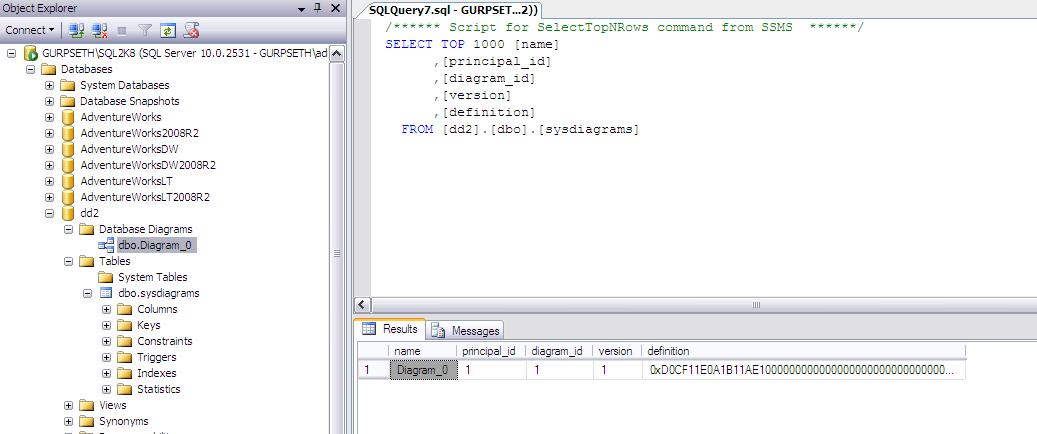
So I used ADVENTUREWORKS database and created Database Diagram (as shown in above picture). Now when ever we created Database Diagram, its meta data gets saved inside same database (under SYSTEM tables).

Prior to jumping to think how to move this diagram to another instance, I would like to think about how normally we take/move databases or its objects?


If I am not wrong we have EXPORT/IMPORT utility to take object level movement of database objects. So lets try to explore the same.


So as we can see, we can export the database diagram but we also have to export objects ith which Database Diagram objects are associated. If we don't include them in Export them table will be moved along with data but we will be able to open this Database Diagram completely.


Regards

Gurpreet Sethi


Calculate Days, Hours, Mins & Seconds From Two Dates

Hi,
Recently one of our friend posted a question on MSDN. Question was to how to calculate Different between 2 dates in terms of Day, Hour, Month & Seconds. One of our other friend (Santy The Tango Charlie) shared the code. I though of sharing it with you as well.

SET NOCOUNT ON

GO

DECLARE @CDate DATETIME

DECLARE @EDate DATETIME

SET @CDate = getdate()

--SET @CDate = '2011-01-01 10:00:00'

SET @EDate = str(year(@CDate))+'-12-31'


select 'StartDate' = @CDate , 'YearEndDate' = @EDate select 'Months' = DATEDIFF(mm,@CDate,@EDate) , 'Days' = DATEDIFF(dd, DATEADD(mm,(DATEDIFF(mm,@CDate,@EDate)),@CDate) ,@EDate) , 'Hours' = case when (DATEDIFF(hh,@CDate,convert(varchar(11),@EDate+1,101)) - (DATEDIFF(dd,@CDate,@EDate)*24))=24 then '00' else DATEDIFF(hh,@CDate,convert(varchar(11),@EDate+1,101)) - (DATEDIFF(dd,@CDate,@EDate)*24) end , 'Minutes' = case when (abs(DATEDIFF(mi,'01:00:00','00:'+str(substring(convert(varchar(11),@CDate,108),4,2))+':00')))=60 then '00' else abs(DATEDIFF(mi,'01:00:00','00:'+str(substring(convert(varchar(11),@CDate,108),4,2))+':00')) end , 'Seconds' = case when (abs(DATEDIFF(ss,'00:01:00','00:00:'+str(substring(convert(varchar(11),@CDate,108),7,2) ))))=60 then '00' else abs(DATEDIFF(ss,'00:01:00','00:00:'+str(substring(convert(varchar(11),@CDate,108),7,2) )))

end

Original Post http://social.msdn.microsoft.com/Forums/en-US/transactsql/thread/1aa5e849-043a-4870-8379-8ba6db19be95 Regards Gurpreet Sethi

SQL 2008 Maintenance Plan Error - 'Alter failed for Server '

Hi,

One of my fellow DBA team member came to me with a problem, but let me provide descriptions of this first.

Description
************


we have a recetnly installed server ofcourse SQL Server 2008, created a maintenance plan with CHECK DATABASE INTEGRITY TASK with INCLUDE INDEXES option selected.


When we execute this maintenance plan it fails with below error:


So as the screenshot mentions that plan is failing because its not able to perform ALTER task in current SQL Instance.

Now why is it so? I am just created a Maintenance Plan with Database Integrity task and its failing? Why?

Troubleshooting
***************


I ran profiler and checked why its failing?

In Profiler I found errors like below when it was trying to execute SP_CONFIGURE 'USER OPTION',0 ; RECONFIGURE

Error: 5808, Severity: 16, State: 1
Ad hoc update to system catalogs is not supported.


Wait.. why its complaining AD HOC UPDATE TO SYSTEM CATALOGS is not supported? Why its trying to change SYSTEM CATALOGS at first place? In SQL Server 2000 and older, this option allowed users to make updates directly to the system tables. In SQL Server 2005 and newer, the system tables are gone, replaced with the Resource Database and system views. This option is no longer supported in SQL Server 2005 and beyond, and though you can set Allow Updates to 1 with no error, as soon as you run RECONFIGURE, you will receive the error that ad hoc updates are not supported. Because Allow Updates had been set to 1 and my Maintenance Plan runs the RECONGIFURE statement, this error was thrown and the Maintenance Plan failed.

As per Books On Line:

Changing the allow updates option will cause the RECONFIGURE statement to fail. Changes to the allow updates option should be removed from all scripts.

So i checked current setting SP_CONFIGURE and found ALLOW_UPDATE config value as 1. So i configured ALLOW UPDATE back to 0 and again ran Maintenance Plan and it executes fine.

Below is the command used for setting this option

SP_CONFIGURE 'ALLOW UPDATE',0
RECONFIGURE


Regards
Gurpreet Sethi